A laptop showing a building model on a beach table, next to a "Beach Life" mug

What Riviera is

Riviera is a parametric Building Information Modeling application for architecture, structure, MEP and sustainability. Your model is an ordinary IFC file, not a proprietary container. Every tool is a command that the ribbon, Lua scripts and AI agents share.

Early-stage project. Riviera is at a very early stage. Most of its specification, research and implementation was carried out autonomously by AI coding agents. Expect features that are incomplete or incorrect at this stage, check results before relying on them, and keep copies of models you care about.

It already models a small building end to end, frames and analyses a steel or timber structure, details steel and concrete reinforcement, routes ducts, pipes and circuits, runs energy, daylight, solar and embodied carbon studies, designs greenhouses, lays out and checks bathrooms, washrooms and spas, draws plans, sections and sheets, and shares models with a team through BIMserver or FileEngine. Pre-release packages are available for Linux (Flatpak), Windows and macOS (Apple silicon).

What it does

Why Riviera

Your model stays yours

IFC is Riviera's native format: IFC2X3, IFC4 and IFC4X3. Walls, floors, roofs, beams and connections are saved as ordinary IFC entities that other tools can read. Files you bring in from elsewhere survive the round trip intact. There is no lock-in and no export step.

Scriptable from the ground up

Every operation is a command with a published schema. Run it from the ribbon, from a Lua script, or let an AI agent drive it through the built-in Model Context Protocol (MCP) server. Claude Code, Antigravity CLI, Qwen Code and Codex CLI run in a terminal inside Riviera, already connected to your model. Scripts and agents get the same undo, warnings and permission checks as you do.

Architecture, structure, MEP and sustainability in one model

Draw walls, roofs and stairs. Then frame the building with columns, beams, braces and trusses, place steel connections, build the analytical model, apply loads and run an analysis. Reinforce the concrete, and route ducts, pipes and circuits through it all. From the same spaces, work out heating and cooling loads, annual energy, daylight, solar potential and embodied carbon. It happens in the same file and the same window.

Part of the open-source BIM ecosystem

Riviera is one part of an open toolchain for BIM. Because it speaks plain IFC, it works alongside the other open-source projects built on the same standard.

  • Open Source BIMserver: the IFC model server from opensourcebim.org. It stores models as objects, with revisions, check-in and server-side queries. Riviera runs as a BIMserver client, so a team can share one model: publish a project, open it as a working copy, check in, and get the latest changes or synchronise, with other people's work merged element by element. BIMserver support was released in pre-release 5 (0.1.0-pre.5) as a prototype.
  • xeokit: the open-source WebGL viewer for BIM models. Share the IFC files Riviera writes with anyone who has a web browser, with nothing to install.
  • FileEngine: an open-source document and model server, also offered as the hosted Proxima File Vault. Its BIM features include browser viewers for IFC and other 3D formats, model comparison, and a BCF issue hub where comments on a model become coordination issues. It can also extract product data from support documents, such as the figures in an EPD or HPD, with a quote from the document behind each value. Riviera opens and saves models on FileEngine through its REST API, with each save kept as a new version and a version history to open or restore. It reads the issues raised on a model in FileEngine's viewer and writes replies and new issues back. It links materials to their EPD and HPD documents on FileEngine, reads their values through FileEngine's extraction, and publishes a material documentation report back. Riviera also reads and writes BCF files, with viewpoints that include section boxes and slice planes. FileEngine support arrived in pre-release 6 (0.1.0-pre.6) as a prototype, with issues and material documents in pre-release 7.

A look inside

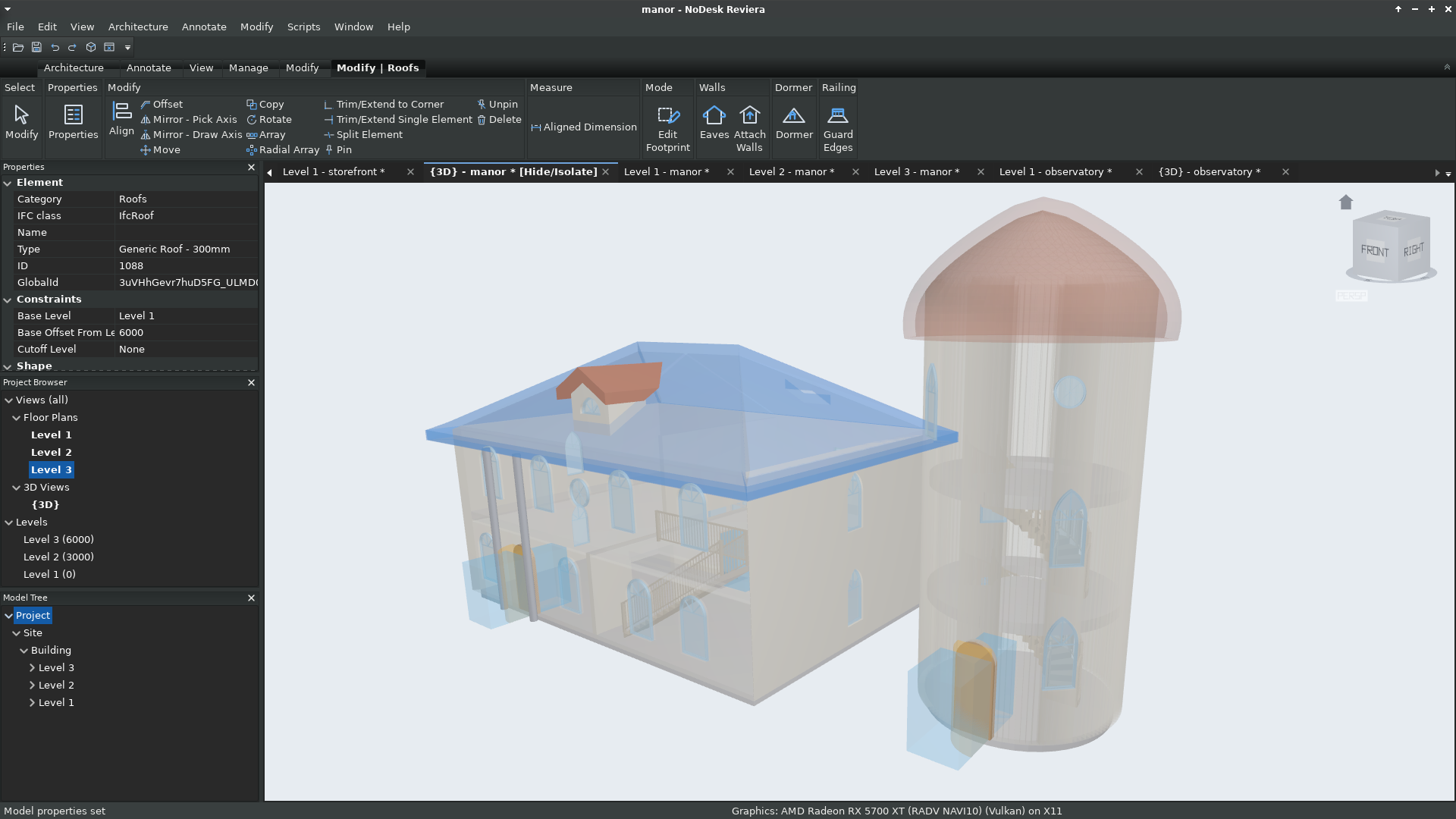
The Manor sample drawn see-through in 3D, its roof selected

The Manor

Dormer, spiral stairs and shaped windows, seen through the walls.

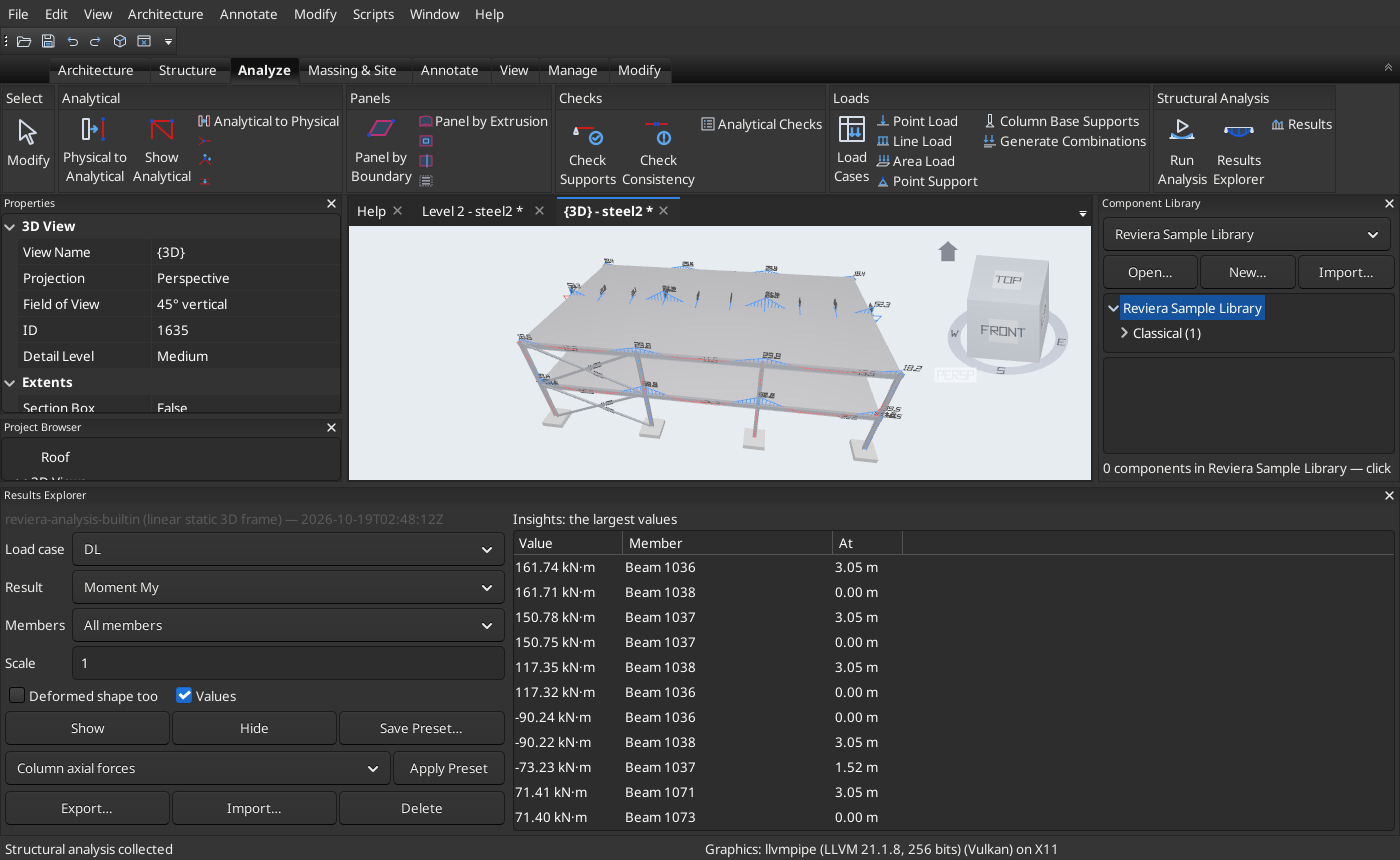
A two-storey steel frame with bending moment diagrams and the Results Explorer

A steel-framed office

Analysed by the built-in solver. The Results Explorer lists the largest moments while the 3D view draws the diagrams.
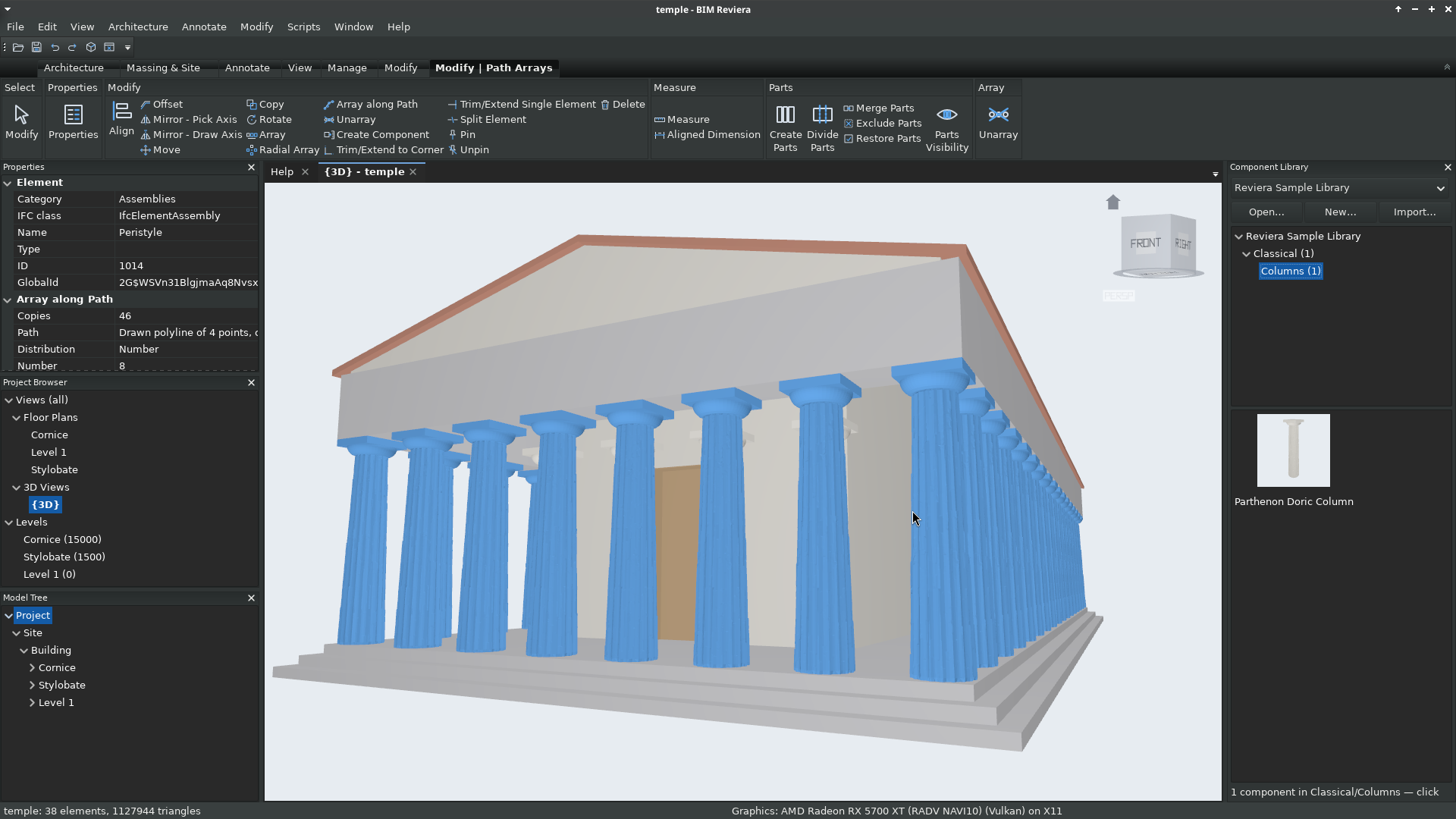
A 46-column Doric colonnade placed by one parametric path array

A Greek temple

46 columns from a Component Library, placed by one parametric path array.
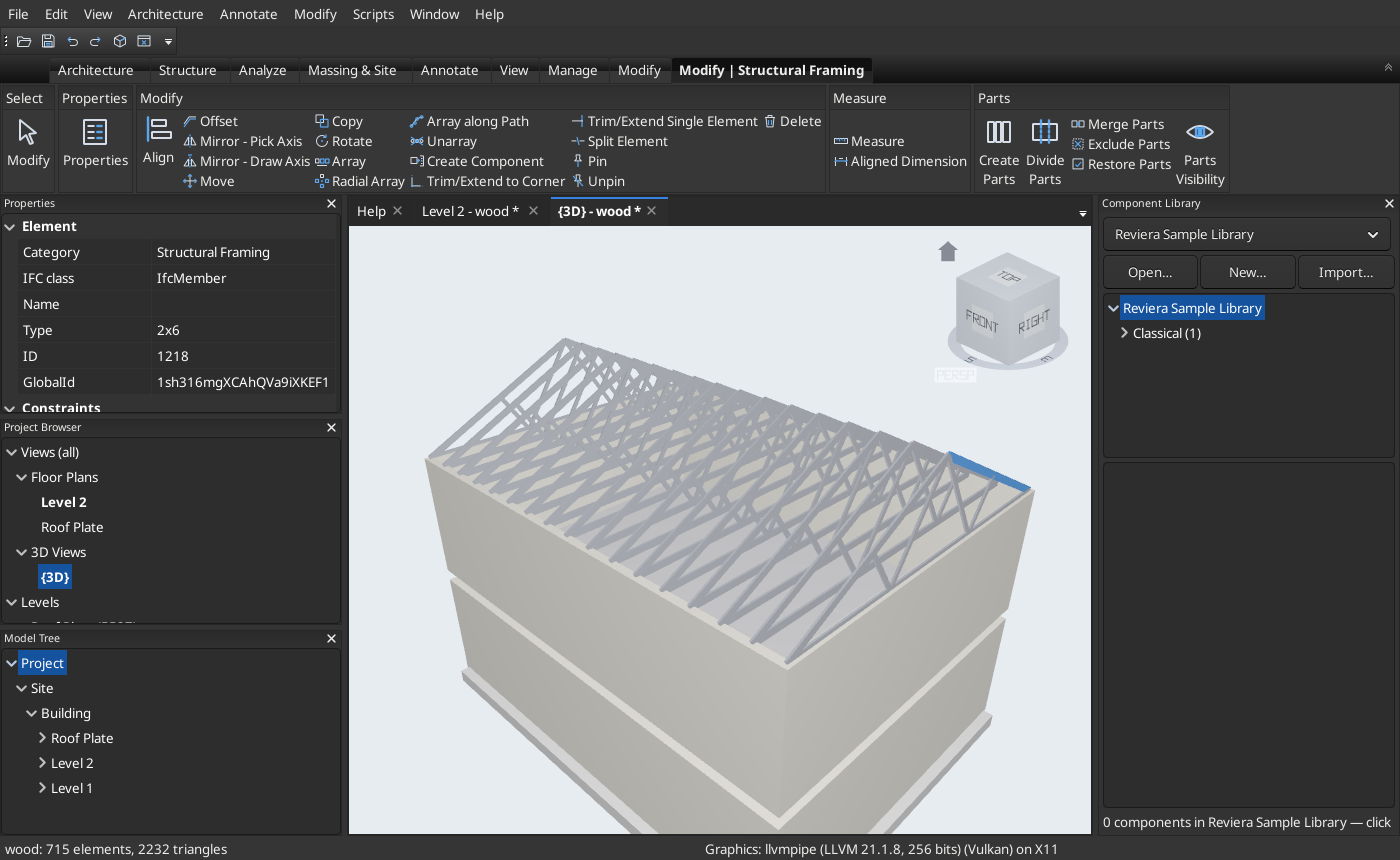
A wood-framed house with Fink roof trusses, a truss chord selected

Wood framing and trusses

Platform-framed walls under gable Fink trusses, with the Modify | Structural Framing tab open.

What you can do today

  • Model buildings: straight and curved walls, doors and windows, floors, ceilings and decks. Hip, gable, arched and domed roofs with eaves and dormers. Stairs, railings with gates, rooms, levels and grids.
  • Design greenhouses: gable, multispan, Venlo, sawtooth and film tunnel ranges from one tool, with glazing and frame libraries, vents and roll-up sides, benches and growing gutters, crop climates and grow lights, screens, heating, ventilation and COâ‚‚ sizing, heating pipes and pad-and-fan cooling laid for you, and glazed and geodesic domes.
  • Design bathrooms, washrooms and spas: fixtures and clear spaces checked against US, ADA and English codes, layouts from templates, grab bars, fixture counts, toilet cores and locker rooms, electrical zones, shower falls and waterproofing, hot tubs, saunas and steam rooms, interior elevations, schedules, tile set-out and a compliance report.
  • Reuse components: Component Libraries of ordinary 3D files and IFC components, placed like stamps, made from any selection and repeated along paths.
  • Work together (prototype): publish, open, check in and synchronise projects on a BIMserver, with other people's changes merged element by element, conflicts decided one by one, and revision history, compare and restore. Open and save versioned models on a FileEngine server, answer the issues raised on them, and read EPD and HPD values from material documents.
  • Coordinate: find overlaps and resolve them with kept booleans. Run clash detection. Check door clearances and paths of travel. Track issues with BCF 3.0 and 2.1, straight from clash results.
  • Frame and analyse structures: steel and timber sections, trusses and foundations. Library steel connections (shear plates, end plates, base plates, gussets), placed one by one or automatically from rules. The analytical model, loads, combinations, a linear static solver and a Results Explorer.
  • Detail steel and concrete: plates, bolts, welds and cuts, part marks and NC files for the shop. Rebar, area and fabric reinforcement, and precast pieces with their shop drawings.
  • Design MEP systems (prototype): ducts, pipes and flex with fittings and accessories, air terminals and equipment, plumbing fixtures, sprinklers and hydronic loops, spaces and system-zones, sizing and pressure drop, lighting and illumination, circuits, panels and panel schedules.
  • Study sustainability (prototype): site location and EPW weather, an energy model from the spaces, heating and cooling loads, annual energy with EUI (or through EnergyPlus), daylight factor, solar and PV yield, and embodied carbon by life-cycle stage. Export gbXML and HBJSON for other energy tools.
  • Set project standards: global parameters with formulas, parameter libraries, classification systems and keynotes, and standards copied from another project.
  • Document: plans, ceiling plans, sections, elevations, legends, schedules and sheets, with crop regions, saved hide and graphic overrides, tags, dimensions, spot elevations and keynotes, exported to PDF and COBie.
  • Automate: Lua scripts and plugins with input forms, and an MCP server for AI agents. Run Claude Code, Antigravity CLI, Qwen Code or Codex CLI in the built-in agent terminal.

Built in the open

Riviera is free software under the GNU GPL v3.0 or later. Its open data formats and protocols are MIT-licensed, so any tool can adopt them, whatever its licence.

Riviera is an independent, original application. It does not copy or clone any existing product, and it does not read or write any product's closed, proprietary formats. IFC is its native format, and DWG and DXF are exchanged only through open-source libraries.